Standing Desks At Home
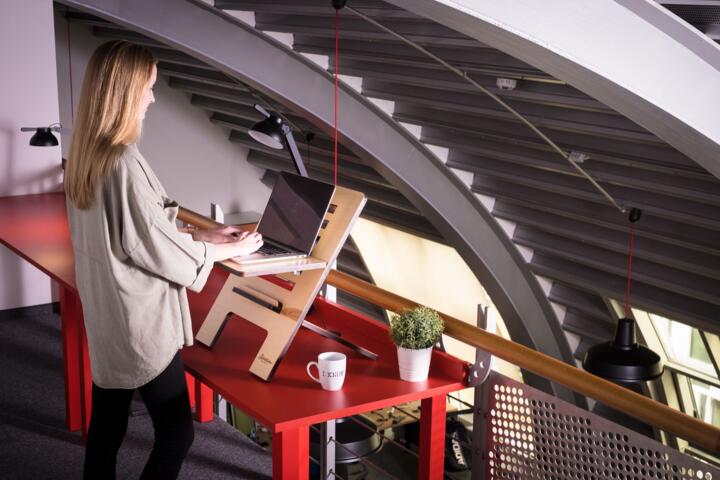
A standing desk is a work surface designed to let you alternate between sitting and standing while using a computer. The main health goal is reducing time spent in one posture, since long static sitting and long static standing both strain the neck, shoulders, and lower back. A common home setup uses a height-adjustable desk, a laptop stand or monitor arm, and a chair you still use for breaks.
Evidence from randomized trials and systematic reviews generally finds that standing desks can reduce sitting time, but the average effects on pain are mixed and often small. For example, a widely cited Cochrane review reported that standing desks reduced time spent sitting, while effects on back pain and other outcomes varied across studies. Another practical number: many ergonomic guidelines suggest changing posture at least every 30 minutes, which is hard to do with a fixed desk.
Pain Points And Myths
People often treat standing as a single health switch: stand more, feel better. That framing misses the dependency on how the desk, monitor, keyboard, and lighting are set. If the monitor sits too low, you’ll flex your neck forward; if the keyboard sits too high, your shoulders may creep up. Those posture changes can worsen symptoms even if sitting time drops.
Another common mistake is assuming that “standing” means stillness. In practice, standing still for long stretches can increase discomfort in the feet and calves and can load the lower back through subtle pelvic changes. Many people end up rocking, shifting weight, or leaning on one leg, which can create asymmetric strain. A standing desk that encourages movement works better than one that just replaces sitting with immobility.
Supporting technologies matter because they determine your angles. Monitor arms change viewing distance and height; laptop-only setups often force you into a forward head posture unless you add a laptop stand. Footrests, anti-fatigue mats, and shoe choice can change comfort, but they do not fix a wrong monitor height. Even the desk’s height range matters: a desk that cannot reach your elbow height for typing can push you into shoulder elevation.
There’s also a practical constraint: home work often includes meetings, document review, and breaks that don’t fit a perfect schedule. If you can’t adjust the desk quickly, you may end up using it only during a narrow window, which limits the benefit. Some adjustable desks also have control systems that require a moment to move between presets; that friction is small but real, and it affects how often you change posture.
Solutions And Setup Advice
Set Height For Neutral Posture
Start with typing posture. When your elbows are near 90 degrees and wrists stay neutral, your shoulders usually relax. Adjust the desk so the keyboard height supports that position while you stand. For the monitor, aim for the top of the screen around eye level; if you use a laptop, a separate stand or monitor arm often matters more than the desk itself.
Use a simple check: sit and stand with the same keyboard and mouse, then compare neck angle and shoulder position. If you feel your chin jutting forward, raise the monitor or lower the screen distance. If your shoulders rise toward your ears, lower the keyboard or adjust the desk height range. A small aside from common home setups: many people buy a desk first and then discover their monitor arm doesn’t fit their desk thickness or mounting points.
Use A Time-Boxed Rotation
Instead of “stand all day,” use a rotation you can sustain. A practical starting point is alternating in blocks such as 20–30 minutes standing, then 20–30 minutes sitting, then repeating. If that feels too aggressive, start with shorter standing blocks like 5–10 minutes and build up over 1–2 weeks.
Track comfort rather than chasing a perfect ratio. If foot discomfort rises quickly, you may need more sitting time, better footwear, or a mat. If lower back tightness increases during standing blocks, reduce standing duration and check desk height again. The goal is to reduce prolonged static posture, not to win a “standing streak.”
Choose Accessories With Intent
Accessories should solve a specific problem. An anti-fatigue mat can reduce discomfort for some people, but it may also change balance and make you sway more; test it for short sessions. A footrest can help if your desk height forces one leg to hang or if your stance feels uneven. For typing, a keyboard tray is less common with standing desks, so monitor arm placement and keyboard height become the main levers.
For laptop users, a laptop stand plus an external keyboard and mouse often improves posture more than a standing desk alone. Many home setups use a monitor arm with a VESA mount; if your monitor is older or lacks VESA compatibility, you may need an adapter or a different mounting approach. I’ve seen setups where the monitor arm was rated for a certain weight, but the monitor’s center of gravity made it drift down—annoying, and it pushes people to change posture to see the screen.
Watch For Red Flags
Standing desks can shift load, so symptoms that worsen during standing blocks deserve attention. Stop and reassess if you develop sharp pain, numbness, tingling down the arm, or persistent worsening of back pain. If discomfort improves when you return to sitting and returns when you stand, the setup is likely contributing.
Also consider circulation and skin issues. People with varicose veins, neuropathy, or significant foot problems may need a more cautious approach and should discuss work modifications with a clinician. If you have a history of musculoskeletal injuries, a physical therapist can help you choose a rotation and verify joint angles, which is often faster than trial-and-error.
Home Office Examples
Example 1: A remote worker with neck stiffness bought a height-adjustable desk but used the laptop on the desk. After two weeks, they noticed more forward head posture and headaches during calls. The fix was not “standing less” alone: they added a monitor arm, raised the screen to eye level, and used the desk’s standing mode for 10-minute blocks. Symptoms improved after the monitor height matched their neutral neck position.
Example 2: A customer support agent stood for long stretches because it felt more active than sitting. They developed foot soreness and lower back tightness by mid-afternoon. They switched to a rotation of 15 minutes standing and 30 minutes sitting, added a mat for short sessions, and changed footwear from flat slip-ons to supportive shoes. The desk stayed in use, but the standing duration became shorter and more frequent.
Checklist To Decide
| Decision Factor | If You Have This | What To Try First | What Would Change Your Mind |
|---|---|---|---|
| Neck or shoulder strain | Screen is too low or you hunch | Raise monitor to eye level; use external keyboard | Pain increases even with correct height |
| Low back tightness | Standing blocks feel worse | Shorten standing time; check keyboard height | Symptoms persist or worsen over 2–3 weeks |
| Foot discomfort | Soreness after standing | Supportive shoes; test mat for short sessions | Numbness, burning, or swelling |
| Budget limits | You can’t buy a full setup | Try a laptop stand + chair adjustments first | You can’t change posture during the day |
Step-by-step checklist for a first month: set monitor height, set keyboard height, choose a rotation you can repeat, test standing blocks for 3–5 days, then adjust one variable at a time. If you use a reminder app (for example, a timer in iOS or Android), set it for posture changes rather than “stand now” alone, because posture includes sitting too.
Common Mistakes To Avoid
Buying a standing desk without planning the rest of the workstation is the most frequent failure mode. A desk can raise and lower, but it cannot fix a laptop screen that forces neck flexion. Another frequent issue is ignoring the chair: if you sit with poor lumbar support, standing becomes a temporary relief rather than a sustainable rotation.
People also overcorrect by standing too long on day one. That often leads to foot soreness and then avoidance, which defeats the goal of reducing static posture. A mild frustration: many desk guides suggest “stand for hours,” but home work schedules rarely support that without fatigue.
Another mistake is using the desk only during a single task. If you stand only while reading emails, you may still sit for long stretches during spreadsheets and meetings. Better results usually come from rotating across tasks, even if standing time stays modest. Some people also forget to account for external devices like docking stations; if the monitor height changes when the laptop is docked, posture can drift.
Finally, people sometimes ignore warning signs because they expect “good pain” from new activity. If symptoms are sharp, radiating, or accompanied by numbness, the safer move is to stop and reassess rather than pushing through.
FAQ
How Long Should I Stand At Work?
Start with short blocks you can repeat comfortably, such as 5–10 minutes, then build toward 20–30 minute standing periods. Use sitting breaks to prevent foot and back discomfort from accumulating.
Do Standing Desks Reduce Back Pain?
Research shows mixed results for pain outcomes. Many studies find reduced sitting time, but average pain improvements vary, so setup quality and rotation schedule often matter as much as the desk itself.
Is A Standing Desk Better Than A Sit-Stand Chair?
A sit-stand chair can reduce sitting time, but it still depends on monitor height and keyboard position. If your screen and input devices remain poorly aligned, either option can worsen posture.
What Monitor Height Works Best?
A common target is the top of the screen near eye level when you’re in a neutral head position. If you use a laptop, raising the screen with a stand or using a monitor arm usually improves neck angle more than changing desk height alone.
Who Should Use Standing Desks More Cautiously?
People with significant foot problems, neuropathy, or circulatory conditions may need a slower ramp-up and clinician guidance. Stop if you develop numbness, burning pain, or swelling that persists.
Author's Insight
Standing desks tend to help most when they change behavior: reducing long uninterrupted sitting and encouraging posture rotation. The health effect depends on workstation alignment, especially monitor height and keyboard position, because standing can create new neck and shoulder loading if the screen is wrong. Evidence supports reduced sitting time, while pain outcomes vary across studies and individuals. A practical approach uses short standing blocks, tracks symptoms, and adjusts one setup variable at a time rather than relying on the desk alone.
Key Takeaways
A standing desk can be worth it for home work when it helps you rotate postures and keeps your monitor and keyboard aligned for neutral posture. Expect benefits like reduced sitting time, but pain relief is not guaranteed and depends on setup quality and how long you stand. Start with a conservative rotation, test for comfort over 1–2 weeks, and adjust monitor height and keyboard position before increasing standing duration.
Limits matter: standing still for long stretches can cause foot and lower back discomfort, and some people need a slower ramp-up or different workstation choices. Seek professional medical advice if pain worsens, if you develop numbness or radiating symptoms, or if you have a condition that affects circulation or nerves. If you want a low-risk next step, measure your current monitor height and keyboard height, then plan a rotation schedule you can follow even on meeting-heavy days.