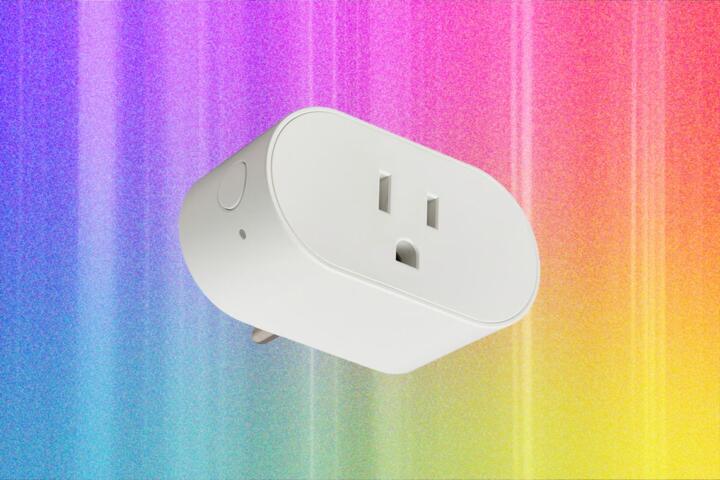
Smart Plugs In Plain Terms
Smart plugs are Wi‑Fi controlled outlets that switch power to a connected device. Most models use a phone app for on/off control and often support schedules, timers, and sometimes energy monitoring. A typical setup pairs the plug to your home network, then you control it through the vendor app or a compatible voice assistant. Some plugs also support local automation via platforms like Home Assistant, while others rely on cloud services that can go offline.
Practical examples show where they fit. A scheduled lamp can reduce “lights left on” habits. A humidifier can run only during sleep hours, which may help keep a room at a steadier humidity level. A heating pad for a specific routine can be turned off automatically after a set time, which reduces the chance of forgetting. The usefulness depends on the device type, the plug’s switching limits, and how reliable the app and network are.
Pain Points And Myths
People often buy smart plugs for outcomes they cannot measure. Turning on a device remotely does not improve the device’s underlying performance, and it does not correct unsafe use patterns. A plug also cannot “fix” a faulty appliance; it only controls the power feed. If a device has a safety thermostat or a medical-grade requirement, the plug’s role stays limited to switching power.
Another frequent misunderstanding involves energy savings. Many smart plugs advertise wattage readings, but the accuracy varies by model and by whether the device has a stable load. For resistive loads like space heaters or kettles, readings tend to be more consistent. For electronics with variable draw, such as some chargers or devices with standby modes, the numbers can fluctuate and confuse decision-making. I once compared two plug models on the same LED lamp; the reported “watts” differed enough that I stopped using the readings for fine-grained billing estimates.
Features Actually Matter
Useful smart plugs usually have a clear set of features that match your goal. For energy awareness, look for power measurement that reports real-time watts and cumulative kWh, then verify it with a simple reference meter if you care about accuracy. For scheduling, check whether the plug can run schedules without internet and whether it supports multiple schedules per day. For safety routines, prioritize a reliable “power off after X minutes” timer and a manual physical switch.
Compatibility matters for automation. If you want local control, check whether the plug supports local integrations such as Home Assistant via supported protocols. If you rely on a voice assistant, confirm the plug supports the same ecosystem across your devices. Some plugs support Matter, which can reduce dependence on vendor cloud for basic control, but support varies by model and region.
Load rating is a practical constraint. Many smart plugs list a maximum current or wattage, often around 10–16 A depending on region, but the exact number depends on the product. High-power devices like portable heaters can exceed the safe continuous load if the device draws near the limit. If you plan to switch a humidifier, check the plug’s rating for the environment and avoid using it where splashes or condensation can reach the outlet.
Use Cases With Real Measurable Value
Pick goals you can observe. Energy reduction can be tested by comparing “device on-hours” before and after scheduling, then checking your utility bill over a billing cycle. If you use a smart plug for a humidifier, track room humidity with a separate hygrometer and compare how often the humidifier runs. For safety routines, measure “time-to-off” behavior by setting a 10-minute timer and confirming the plug cuts power reliably.
When you test, use one device at a time. Plug in a lamp or a small fan first to confirm basic switching and app control. Then move to the higher-stakes device only after you confirm stable Wi‑Fi connection and consistent timer behavior. This avoids the common mistake of troubleshooting two variables at once.
How To Set Up Without Cloud Surprises
Start with network stability. Place the plug where it maintains a strong Wi‑Fi signal, and avoid adding it to a weak mesh node. If your router supports separate 2.4 GHz and 5 GHz networks, many plugs require 2.4 GHz; the setup app usually tells you. During setup, watch for pairing prompts that mention “local control” or “offline scheduling,” because those terms change what happens when the internet is down.
After pairing, test offline behavior. Turn off your internet connection for a short period and see whether the plug keeps scheduled actions. Some models pause, which can break routines that you assumed would run during outages. If you use a home automation hub, check whether it can control the plug without vendor cloud; I’ve seen setups where the hub worked, but the plug still depended on the vendor service for certain automations.
Energy Monitoring: Treat Numbers Carefully
Power readings are often good enough for coarse decisions, not for lab-grade measurement. For resistive loads, the reported watts usually track changes in a predictable way. For devices with variable draw, the plug may show spikes and dips that do not match your intuition. If you want a sanity check, compare the plug’s kWh reading against a plug-in energy meter or a device’s label over a known run time.
Use the readings to answer “did I reduce runtime?” rather than “what is the exact cost to the cent?” A realistic outcome is a reduction in accidental on-time, which can matter more than the plug’s absolute accuracy. If your goal is cost savings, track the device’s on-hours and multiply by your electricity rate using your utility bill, then compare month-to-month.
Case Examples
Humidifier Scheduling In A Bedroom
An anonymized household uses a smart plug for a bedroom humidifier to reduce overnight dryness. They set a schedule for 30–60 minutes before sleep and a second short window during the night. Instead of trusting the plug’s energy numbers, they monitor room humidity with a separate hygrometer and adjust the schedule based on results. After two weeks, they find the humidifier runs fewer hours overall, and the room humidity stays within a comfortable range. The plug remains useful because the outcome is measured by humidity, not by app graphs.
Reducing “Forgotten Off” For A Lamp
A second scenario involves a lamp used during evening routines. The household sets a timer to turn the lamp off after a typical reading window and uses remote control when guests arrive. They test reliability by leaving the lamp on for a short session and confirming the plug cuts power at the expected time. When the internet connection drops, the lamp schedule continues on some days but pauses on others, depending on the plug model. They keep a manual switch habit for the days when offline scheduling fails.
Checklist For Buying
| Decision Factor | Good Fit | Watch Outs | How To Verify |
|---|---|---|---|
| Offline Scheduling | Schedules run during internet outages | Some models pause until cloud reconnects | Test by turning off internet for 1–2 hours |
| Energy Monitoring | Useful for runtime reduction | Accuracy varies by load type | Compare to a plug-in energy meter for one device |
| Load Rating | Matches device wattage and duty cycle | Heaters and enclosed use can exceed safe limits | Check device label watts and plug rating; avoid near-limit loads |
| Automation Control | Works with your existing hub or app | Vendor app changes can break routines | Confirm compatibility with your platform before buying |
Step-by-step checklist: choose one device and one goal, verify the plug’s rated load for that device, set a short timer test, test offline behavior, then measure the outcome you care about for at least one billing period or one routine cycle. If the outcome depends on internet reliability, treat offline scheduling as a requirement, not a bonus.
Mistakes That Reduce Trust
People often assume that “smart” means “safer.” A smart plug does not add thermal protection, moisture protection, or medical-grade safety. It only switches power, so the connected device’s safety features still govern risk. Another mistake is buying a plug for a high-watt heater without checking the device’s continuous draw and the plug’s rating.
Some buyers also over-trust energy graphs. If a device cycles on and off internally, the plug’s readings can look noisy, and the app may average them in ways that hide short spikes. When you compare two plugs, you may see different numbers for the same device, which makes it harder to judge savings. I’ve seen people chase those differences and end up changing schedules without a clear measurement plan.
FAQ
Do Smart Plugs Work Without Wi‑Fi?
Some models keep schedules running during internet outages, while others pause until the cloud reconnects. Check the product documentation for “offline scheduling” and test by disconnecting internet for a short period.
Are Smart Plugs Safe For Heaters?
Safety depends on the plug’s rated load and the heater’s continuous wattage. Many heaters can exceed typical plug ratings or create heat buildup around the outlet, so verify both ratings and avoid enclosed or poorly ventilated placements.
Do Smart Plugs Measure Energy Accurately?
They often provide useful estimates for runtime tracking, but accuracy varies by load type and model. For decisions that require precision, compare readings to a plug-in energy meter for the same device over a known time.
Can Smart Plugs Help With Humidifier Routines?
They can reduce accidental on-time by scheduling power, but they do not control humidity directly. Use a separate hygrometer and adjust schedules based on measured room humidity rather than app wattage alone.
What Happens If The App Stops Working?
Remote control may stop, and some automations may fail if they depend on vendor cloud. Local automation support varies by model, so check for local control options or hub compatibility before relying on the plug for critical routines.
Author's Insight
Smart plugs tend to be most useful when they reduce human error: forgetting to turn off a device, leaving a humidifier running too long, or missing a routine timer. Their limits come from dependencies on Wi‑Fi signal quality, app reliability, and sometimes cloud services. Energy monitoring can help with coarse estimates, but load type affects accuracy, so runtime tracking beats “exact cost” claims. A practical evaluation uses one device, one measurable outcome, and a short offline test before trusting the schedule.
Key Takeaways
- Smart plugs switch power; they do not replace device safety systems for heat or moisture.
- Offline scheduling and load rating matter more than marketing features.
- Energy readings are best for runtime decisions, not precise billing.
- Test with short timers and verify behavior during an internet outage.
- Keep manual fallbacks for routines that affect comfort or safety.